GIF Presentation of LID’s in InfoSWMM Sustain
GIF Presentation of LID's in InfoSWMM Sustain
This GIF was originally made in Powerpoint and gifmaker.me


This GIF was originally made in Powerpoint and gifmaker.me
LID Candidates for Optimizztion in InfoSWMM Sustain
STEP 1: Use the LID Optimizer Tool
Use the LID Optimizer tool (1) to import all of the LID's with a Subcatchment (2).

STEP 2: Import all of the LID Candidates found by the Siting Manager of InfoSWMM Sustain
All of the possible … Read the rest
What is New in InfoSWMM Sustain 2.0
New to InfoSWMM 14.5 Update #1 is the ability to use Hydrology for ALL InfoSWMM Hydrology options with Groundwater, LID and Sustain Optimization. This means other hydrology options beside EPA SWMM Hydrology can be used with InfoSWMM Sustain.
Here is a list of … Read the rest
Draw Storage Shapes and Transect Curves in #InfoSWMM
Draw previously created Storage Curves created by the Storage Curve Tool or draw the previously saved Transects created by the Transect cutting tool in InfoSWMM.
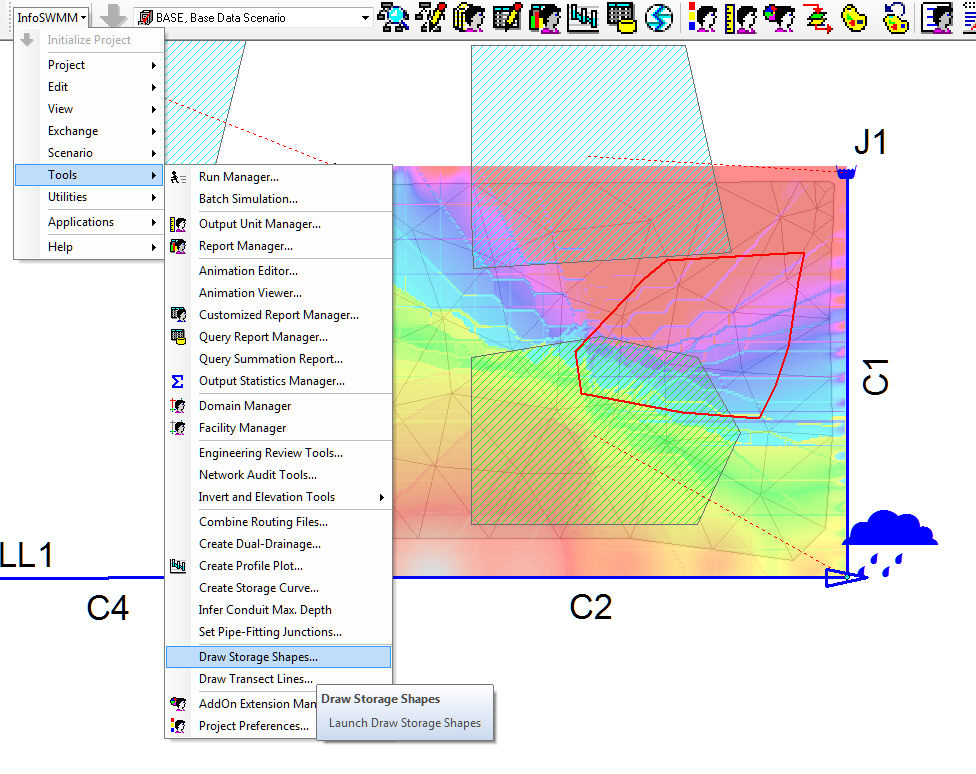
Draw previously created Transects by the Create Transect Tool

InfoSWMM and H2OMap SWMM offers 12 choices for modeling surface runoff (click on link to see more information on each method):
· The Colorado Urban Hydrograph Procedure (CUHP)
EPA #SWMM's Groundwater Equation


Introduction: H2OCalc is a hydrology and hydraulics calculator sold by Innovyze that has many of the equations and calculation methods used in InfoSWMM, ICM and SWMM5.
The dialog box for EPA SWMM’s aquifer production equation is shown below.

Input for EPA SWMM’s aquifer production equation:… Read the rest
Weir Background Equations for #SWMM5 and #InfoSWMM
Introduction: H2OCalc is a hydrology and hydraulics calculator sold by Innovyze that has many of the equations and calculation methods used in InfoSWMM, ICM and SWMM5. This is the H2OCalc information for the Weir Equations.
Discharge in channels and small streams can be … Read the rest
Time of Concentration Equations for #InfoSWMM and H2OMap SWMM
Introduction: H2OCalc is a hydrology and hydraulics calculator sold by Innovyze that has many of the equations and calculation methods used in InfoSWMM, ICM and SWMM5.
The dialog box for estimating time of concentration using Kirpich (Kipich sp) method is shown … Read the rest
Pump Calculations for #InfoSWMM and #SWMM5
Introduction: H2OCalc is a hydrology and hydraulics calculator sold by Innovyze that has many of the equations and calculation methods used in InfoSWMM, ICM and SWMM5. This is the H2OCalc information for Pumps.
A Pump is used to augment head to the system … Read the rest
Head loss due to Transitions and Fittings (Local loss)
Introduction: H2OCalc is a hydrology and hydraulics calculator sold by Innovyze that has many of the equations and calculation methods used in #InfoSWMM, #ICM and #SWMM5. This is the H2OCalc information for the Minor loss Equations.
Whenever flow velocity changes direction … Read the rest
InfoSewerH20Map Sewer recognizes two different types of Controls. They are as follows:
· Initial Status - Initial status prescribes the initial setting for a pump InfoSewerH20Map Sewer Project. This control on the element may be over written by the Simple … Read the rest
Steady-state analysis and design of storm sewers is usually accomplished under worst (i.e., peak) runoff conditions to test transporting capacity of the network without causing major flooding or overflows. The Rational method is the most widely used technique for estimation of peak flow … Read the rest
In the past few years, advances in infrastructure management technology have been occurring at an accelerated pace. This technology is now being realized within the context of sanitary and storm sewer modeling. It has allowed sewer collection system modeling … Read the rest
Pumps in InfoSewer and H20Map Sewer
A pump is a link that imparts energy to a fluid thereby raising its hydraulic head. Pumps are needed in a gravity sewer system to prevent deep excavations, and are designed to lift the fluid to a desired level that produces gravity flow condition … Read the rest
InfoSewerH20Map Sewer provides unparalleled network analysis and simulation capabilities for performing a wide range of essential modeling tasks. WithInfoSewerH20Map Sewer, the entire sewer collection system or any selected sub-system may be analyzed under steady state and extended period simulations. Please note the stormwater … Read the rest
Exporting To Sanitary Sewer Conveyance System Models for InfoSewer
InfoSewerH20Map Sewer /Pro can write the contents of a network model created in InfoSewerH20Map Sewer Pro to standard GIS formats (e.g., Shapefiles) for use in other applications.
This will prove useful for sharing your modeling efforts with your organization via enterprise … Read the rest
Manholes in InfoSewer and H2OMap Sewer
Manholes are points in the network where links join together and where loads enter the network. They are also placed at locations where pipe characteristics change (e.g., diameter and slope). The basic input data required for manholes is:
How to Rebuild the IEDB Folder for InfoSewer, the IWDB Folder for InfoWater or the ISDB Folder for InfoSWMM
This is how you can fix a projection issue. Please follow the instructions below to rebuild the IEDB folder. For the instructions below, Model1 is the original model and Model2 is … Read the rest
Rules for  Routing in InfoSewer and H2OMap Sewer
1. Loading Manholes can take unlimited flow
2. Gravity Mains will take all of the flow from the Loading Manholes, but
3. d/D will be 1 and q/Q or q over Qfull will be much greater than 1
4. A Wet Well … Read the rest
How to Make Large Icons in Arc GIS or Arc Map for InfoWater, InfoSWMM or InfoSewer
Use the Customize mode
in Arc GIS and pick Large Icons in the Options Tab. It really helps to see large Icons.
Steps:
 1. Click the Customize menu and click Customize Mode.
2. Click … Read the rest
 …
… 