InfoSWMM_SA

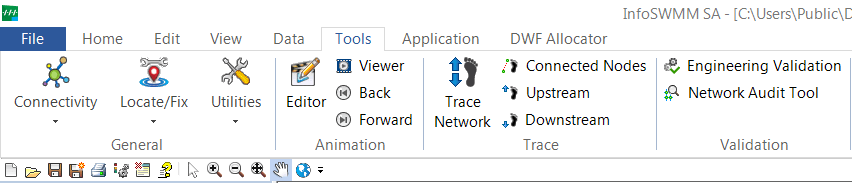
InfoSWMM SA Tools Menu

InfoSWMM SA Tools Menu

Tools Menu - This menu contains the basic tools of InfoSWMM SA that allow you to run the simulation and report the results. The basic modeling and analysis tools are incorporated into the Tools Menu.
Connectivity Menu

The Connectivity sub-menu is used to verify network connectivity … Read the rest

InfoSWMM_SA

InfoSWMM SA Quick Access Toolbar

InfoSWMM SA Quick Access Toolbar

InfoSWMM SA has a powerful Quick Access Toolbar for most file and general commands. You can show the menu above or below the InfoSWMM SA ribbon. Additionally, you can add any command to the Quick Access Toolbar by right mouse clicking on a command and … Read the rest

InfoSWMM_SA

InfoSWMM SA Edit Menu

InfoSWMM SA Edit Menu

The InfoSWMM SA Edit Network toolbar provides various features to create data elements (such as Junctions, Tanks, Reservoirs, Pumps, Valves, Pipes and Network), select specific elements for data edit. Also graphical edit commands such as Move Node, Edit Vertices, Redraw Pipes may be accessed. Domain Manager … Read the rest

InfoSWMM_SA

InfoSWMM SA Home Menu

InfoSWMM SA Home Menu

The InfoSWMM SA Home Tab is a collection of shortcut buttons to access commonly-used InfoSWMM SA commands.

Map Inquiry Ribbon

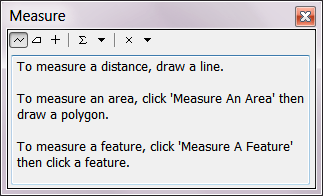
  • measure the distance on the InfoSWMM SA Map. This tool will not work if the spatial coordinates are not defined in the InfoSWMM SA model
  • identify
Read the rest
InfoSWMM_SA

InfoSWMM SA Data Menu

InfoSWMM SA Data Menu

Data Menu - The different tools to manipulate the InfoSWMM SA database are provided here.

Scenario Menu - The Scenario Explorer is an essential feature that enables the user to create, edit, modify, run, and compare any number of "what if" modeling scenarios with … Read the rest

InfoSWMM_SA

InfoSWMM SA Ribbon User Interface

InfoSWMM SA Ribbon User Interface

InfoSWMM SA has an easy to use Interface which allows you to work more productively with a modern, workflow-centric, ribbon user interface. The new interface is designed to help you quickly find the commands that you need to complete and understand your network. InfoSWMM SA … Read the rest

#INFOSWMM, ICM, InfoSWMM, NCIMM Blogs, Rossman, SWMM 5.1.012, SWMM 5.1.013, SWMM 5.1.014, SWMM5

EPASWMM5 Tutorial with Images for SWMM 5.1.014

EPASWMM5 Tutorial with Images for SWMM 5.1.014

This is a one HTML file version of the SWMM 5 Tutorial for modeling the quantity and quality of stormwater runoff produced from urban areas. You can find the original in the current EPA SWMM5 Help file. More images have been added. The … Read the rest

#INFOSWMM, Huber, InfoSWMM, InfoSWMM_SA, Rossman, SWMM5

References for InfoSWMM and InfoSWMM SA

References for InfoSWMM and InfoSWMM SA

  • American Society of Civil Engineers Manuals and Reports on Engineering Practice No. 60 (1982). Gravity Sanitary Sewer Design and Construction. Reston, VA.
  • Clark, C.O. (1945). “Storage and the Unit Hydrograph,” Transaction of the ASCE, Vol. 110.
  • Espey, W.H., D.G. Altman (1978). “Nomographs for 10-minute
Read the rest
#INFOSWMM, InfoSWMM, InfoSWMM_SA

Scenario Explorer – Facility Tab in InfoSWMM and InfoSWMM SA

Scenario Explorer - Facility Tab in InfoSWMM and InfoSWMM SA

The facility set defines those network components (e.g., conduits, Subcatchments, pumps, junctions, etc.) that will be considered during the next InfoSWMM H2OMap SWMM InfoSWMM SAsimulation. The facility set may include the entire network model or a subset of network components. … Read the rest

#INFOSWMM, InfoSWMM, InfoSWMM_SA, SWMM5

Using Simulation Task Manager in InfoSWMM and InfoSWMM SA

Using Simulation Task Manager in InfoSWMM and InfoSWMM SA

Using Simulation Task Manager is simple and straightforward.

  • Enable Simulation Task Manager from the modeling software
  • Schedule the simulation task using Run Manager by using the command tools/preferences/operation Use Simulation Task Manager
  • Manage scheduled simulations from Simulation Task Manager (Note:
Read the rest
Translate »
Scroll to Top