2016

#INFOSWMM, InfoSWMM, Innovyze, SWMM5

Head loss due to Transitions and Fittings (Local loss) in #InfoSWMM and #SWMM5

Head loss due to Transitions and Fittings (Local loss)

Introduction: H2OCalc is a hydrology and hydraulics calculator sold by Innovyze that has many of the equations and calculation methods used in #InfoSWMM, #ICM and #SWMM5. This is the H2OCalc information for the Minor loss Equations.

Whenever flow velocity changes direction … Read the rest

#INFOSEWER, Force Mains, InfoSewer, InfoSWMM, Water Quality

InfoSewer and H20Map Sewer By Discharge Control for a PUMP

InfoSewer and H20Map Sewer By Discharge Control for a PUMP

InfoSewerH20Map Sewer recognizes two different types of Controls. They are as follows:

· Initial Status - Initial status prescribes the initial setting for a pump InfoSewerH20Map Sewer Project. This control on the element may be over written by the Simple … Read the rest

#INFOSEWER, Force Mains, InfoSewer, InfoSWMM, Water Quality

Stormwater Modelling in InfoSewer and H2OMap Sewer

Stormwater Modelling in InfoSewer and H2OMap Sewer

Steady-state analysis and design of storm sewers is usually accomplished under worst (i.e., peak) runoff conditions to test transporting capacity of the network without causing major flooding or overflows. The Rational method is the most widely used technique for estimation of peak flow … Read the rest

#INFOSEWER, Force Mains, InfoSewer, InfoSWMM, Pumps, Water Quality

InfoSewer and H20Map Sewer Theory for Nodes, Links and Force Mains/Pumps

InfoSewer and H20Map Sewer Theory for Nodes, Links and Force Mains/Pumps

In the past few years, advances in infrastructure management technology have been occurring at an accelerated pace. This technology is now being realized within the context of sanitary and storm sewer modeling. It has allowed sewer collection system modeling … Read the rest

#INFOSEWER, Force Mains, InfoSewer, InfoSWMM, Water Quality

Simulation Capabilities in InfoSewer and H2OMap Sewer

Simulation Capabilities in InfoSewer and H2OMap Sewer

InfoSewerH20Map Sewer provides unparalleled network analysis and simulation capabilities for performing a wide range of essential modeling tasks. WithInfoSewerH20Map Sewer, the entire sewer collection system or any selected sub-system may be analyzed under steady state and extended period simulations. Please note the stormwater … Read the rest

#INFOSEWER, Force Mains, InfoSewer, InfoSWMM, Water Quality

Exporting To Sanitary Sewer Conveyance System Models for InfoSewer

Exporting To Sanitary Sewer Conveyance System Models for InfoSewer

InfoSewerH20Map Sewer /Pro can write the contents of a network model created in InfoSewerH20Map Sewer Pro to standard GIS formats (e.g., Shapefiles) for use in other applications.

This will prove useful for sharing your modeling efforts with your organization via enterprise … Read the rest

#INFOSEWER, Force Mains, InfoSewer, InfoSWMM, Water Quality

Manholes in InfoSewer and H2OMap Sewer

Manholes in InfoSewer and H2OMap Sewer

Manholes are points in the network where links join together and where loads enter the network. They are also placed at locations where pipe characteristics change (e.g., diameter and slope). The basic input data required for manholes is:

  • The rim elevation , i.e. the
Read the rest
#INFOSEWER, #INFOSWMM, InfoSewer, InfoSWMM, InfoWater, Innovyze

How to Rebuild the IEDB Folder for InfoSewer, the IWDB Folder for InfoWater or the ISDB Folder for InfoSWMM

How to Rebuild the IEDB Folder for InfoSewer, the IWDB Folder for InfoWater or the ISDB Folder for InfoSWMM

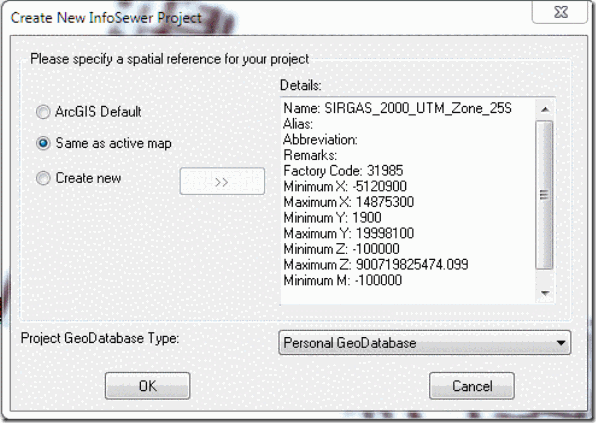
This is how you can fix a projection issue. Please follow the instructions below to rebuild the IEDB folder. For the instructions below, Model1 is the original model and Model2 is … Read the rest

#INFOSEWER, #INFOSWMM, InfoMaster, InfoSewer, InfoSWMM, InfoWater, Innovyze

How to Make Large Icons in Arc GIS or Arc Map for InfoWater, InfoSWMM or InfoSewer

How to Make Large Icons in Arc GIS or Arc Map for InfoWater, InfoSWMM or InfoSewer

Use the Customize mode

in Arc GIS and pick Large Icons in the Options Tab. It really helps to see large Icons.

Steps:
1. Click the Customize menu and click Customize Mode.

2. Click … Read the rest

#INFOSEWER, Force Mains, InfoSewer, InfoSWMM, Water Quality

Design in H2OMAP Sewer and InfoSewer

Design in H2OMAP Sewer and InfoSewer

STEADY STATE DESIGN

A sanitary sewer collection system has basically two main functions: to convey the designed peak discharge and to transport solids so that deposits are kept to a minimum. It is imperative, therefore, that the sanitary sewer has adequate capacity for the … Read the rest

#INFOSEWER, Force Mains, InfoSewer, InfoSWMM, Water Quality

Innovyze InfoSewer vs InfoSWMM and H2OMap SWMM vs H2OMap Sewer

Innovyze InfoSewer vs InfoSWMM and H2OMap SWMM vs H2OMap Sewer

A short comparison of the features in infoSWMM and infoSewer. Many of the same rows apply to H2OMap SWMM and H2OMap Sewer.

Feature Class Feature InfoSewer InfoSWMM
Base Functionality Conservative Solution as an option
Public domain engine
Calibrate model to
Read the rest
#INFOSEWER, Force Mains, InfoSewer, InfoSWMM, Water Quality

Compare Data Scenarios in InfoSewer and H2OMap Sewer

Compare Data Scenarios in InfoSewer and H2OMap Sewer

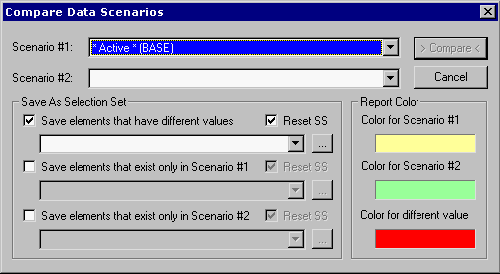
H2OMAP Sewer’s Compare Scenario command allows the user to monitor the differences between any two scenarios in a model.

To compare two scenarios, from the Scenario menu, select Compare Scenarios. The following dialog box will be displayed:

Scenario #1 - The … Read the rest

#INFOSEWER, Force Mains, InfoSewer, InfoSWMM, Water Quality

Water Quality Capability in InfoSewer and H2OMap Sewer

Water Quality Capability in InfoSewer and H2OMap Sewer

H2OMAP Sewer provides seven options for sewage quality analysis in conjunction with a hydraulic simulation. The purpose of the quality model is to simulate loading, buildup and washoff, and transport of various water quality constituents resulting from domestic, commercial, and industrial wastes.… Read the rest

#INFOSEWER, Force Mains, InfoSewer, InfoSWMM, Water Quality

InfoSewer and H2OMap Sewer Extended Period Dynamic Simulation (Unsteady Flow)

InfoSewer and H2OMap Sewer Extended Period Dynamic Simulation (Unsteady Flow)

InfoSewerH20Map Sewer Pro tracks the movement of wastewater flowing through the network over an extended period of time under varying wastewater loading and operating conditions. The extended period simulation (EPS) model implemented in InfoSewerH20Map Sewer Pro is a fully dynamic … Read the rest

Translate »
Scroll to Top